
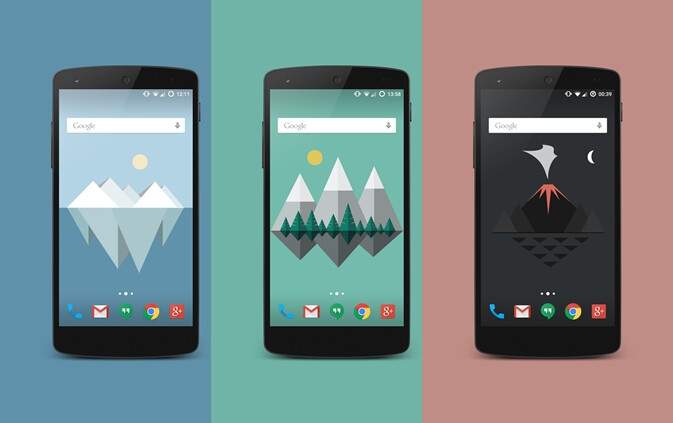

If you’ve been staring at the same wallpaper for months — maybe that default gradient or a random photo you barely notice anymore — you’re not alone. Most of us forget how much a wallpaper can shape the feel of our phones. It’s the first thing we see dozens of times a day, yet we rarely think to change it.
That’s where material wallpapers come in. These designs are more than just pretty pictures; they’re built on Google’s Material Design philosophy — clean lines, soft shadows, and vibrant color contrasts that make your screen feel dynamic and modern. Whether you’re into something sleek and minimalist or bold and full of energy, there’s definitely a material wallpaper that will click with you.
Let’s walk through some of the best ones — and maybe help your Android screen feel new again.
Why Material Wallpapers Feel So Good on Android
There’s something oddly satisfying about material wallpapers. They just fit. Here’s why they stand out from the usual images you find floating around wallpaper apps.
- Vibrant, Lively Colors
Material wallpapers aren’t shy about color. They use vivid hues that pop — blues, corals, teals, and soft neutrals that feel intentionally balanced. If you’ve ever wished your home screen looked a bit more energetic (without being chaotic), material designs do that beautifully.
And don’t worry — you don’t have to go neon. Many material wallpapers come in subtle palettes that feel fresh without screaming for attention. - Subtle Textures That Add Depth
What sets these wallpapers apart is their use of texture. It’s not something you consciously notice right away, but it’s there — those layered shadows and smooth gradients that make flat shapes feel tactile. That slight depth gives your screen dimension, even though it’s perfectly flat. Funny how that works. - Cohesive Design Language
Since material wallpapers are built with Google’s Material Design guidelines in mind, they tend to feel right at home on Android devices. The icons, widgets, and wallpaper — they all complement one another. It’s like everything’s speaking the same design language. You notice the difference when things don’t match. - Works on Almost Every Device
Whether you’re using the latest Pixel or an older Samsung model, material wallpapers scale beautifully. They’re designed in vector-friendly styles, so you won’t lose quality or sharpness even on high-resolution screens.
The Top 5 Material Wallpapers for Android
You’ve probably seen hundreds of wallpaper options out there, but these five have that extra polish — the kind that feels intentional and timeless.
- Material Islands
Imagine soft, geometric islands floating under a wide blue sky. “Material Islands” captures that calm, clean aesthetic that Google fans love. It’s minimalist but not sterile — a touch of dreaminess without losing structure. Perfect if you like something peaceful that still feels designed. - Material Mountains
There’s something grounding about mountains — and this wallpaper nails it. Snow-capped peaks rendered in simple, layered shapes, with gradients that fade beautifully into the sky. It’s crisp, bold, and quietly inspiring. Great for anyone who wants their phone to feel a bit more zen. - Material Beach
This one’s more playful. Think of brightly colored umbrellas arranged neatly across golden sand. It’s fun, summery, and has a cheerful vibe that’s hard to ignore. Maybe not for everyone — but if you like a lighthearted screen that reminds you of sunny days, it’s a good pick. - Material Forest
“Material Forest” is calmer — deep greens, long shadows, a sense of quiet. It’s the kind of wallpaper that feels refreshing, especially if you spend your day surrounded by screens and city noise. There’s something genuinely soothing about it, like a pause between notifications. - Material Waves
This one’s bold. Strong curves and layered blues that move like waves frozen mid-motion. It’s a little dramatic, a little hypnotic — perfect for people who like their screen to stand out just a bit more.
How to Download and Set a Material Wallpaper
Setting a new wallpaper on Android is simple, but if you haven’t done it in a while, here’s a quick refresher:
- Download the wallpaper you like to your device.
- Open Settings > Display > Wallpaper.
- Tap Choose a new wallpaper or similar.
- Find the image you downloaded.
- Adjust the crop if needed, then tap Set wallpaper.
If you’d rather skip manual steps, apps like Walli, Backdrops, or Resplash have curated material wallpaper sections you can browse anytime.
A Few Tips Before You Pick One
- Try to match the wallpaper’s tones with your icon theme or widgets — it makes your home screen look cleaner.
- Don’t be afraid to experiment. Sometimes the wallpaper you least expect becomes your favorite after a few days.
- Change it up regularly. A fresh background can make your phone feel new again, even when it’s not.
- On OLED screens, darker material wallpapers can help save a bit of battery. Small perk, but worth noting.
Frequently Asked Questions
Q: Are material wallpapers compatible with all Android devices?
A: Yes. Because they’re high-resolution images (not live wallpapers), they work across almost every Android model — phones and tablets alike.
Q: Do they affect battery life?
A: No, not noticeably. They’re static images, so unlike live wallpapers, they won’t drain extra power.
Q: Can I make my own material wallpaper?
A: Absolutely. If you’re into design, tools like Figma, Canva, or Adobe Illustrator can help you create custom material-style wallpapers using geometric shapes and gradients.
Final Thoughts
It’s funny how something as simple as a wallpaper can change the mood of a device. Material wallpapers bring a sense of order, color, and creativity that makes using your phone just a little more enjoyable.
So, maybe take a minute today — swap out that tired background for something with personality. Whether you go for the calm of Material Forest or the energy of Material Waves, your Android device will thank you.
And who knows — maybe you’ll even find yourself looking at your screen a little differently.


