
Understanding Blue Light and Its Effects
Modern life adds brightness to screens, but there’s one side to this pervasive light—blue light—that we really need to talk about. Color isn’t only about what we see; it’s also about our well-being, though that connection isn’t always obvious at first.
What Is Blue Light, Exactly?
Simply put, blue light is part of the visible light spectrum that the human eye can see. It has a shorter wavelength, which means it emits more energy compared to other colors. You get it from digital screens like your iPhone, LED lighting, and of course, the sun. Blue light is as prevalent as it gets, even if you can’t always see its effects right away.
Here’s the thing—not all blue light is bad. During daylight hours, natural blue light from the sun actually helps regulate our wake-sleep cycle, boosts attention, and even improves mood. The problem comes when we’re exposed to artificial blue light at the wrong times, particularly in the evening when our bodies should be winding down.
The Research Speaks (Though Not Always Consistently)
Studies are increasingly flagging blue light as something to watch out for, though I should mention that the research isn’t entirely one-sided. Its high energy can impact us in several ways:
- Sleep Disruption: By meddling with our circadian rhythm, blue light can delay sleep onset, leading to poorer quality rest. This is perhaps the most well-documented effect.
- Eye Strain: More screen time means more exposure, and this can lead to digital eye strain, with symptoms such as dry eyes, headache, and fatigue. Though honestly, poor posture and viewing distance play roles here too.
- Potential Long-Term Effects: There’s ongoing research into how persistent blue light exposure might relate to retinal issues and possibly accelerate age-related macular degeneration. The jury’s still somewhat out on this one.
Blue Light and Your Sleep
Let’s dive into sleep because this is where things get interesting. Melatonin, the sleep hormone, responds to our body’s internal clock, and that clock takes cues from light—including blue light.
When there’s less blue light around us, our body naturally preps for rest. But when it’s abundant, we stay alert and awake—think of it like nature’s caffeine, except you can’t just switch to decaf. Nighttime exposure to blue light, especially from our iPhones as we check our last emails or scroll through social media (we’ve all been there), can significantly suppress melatonin production. This then delays our sleep phase and can disrupt our overall sleep architecture.
The timing matters more than most people realize. Using your iPhone an hour before bed has a much stronger effect on your sleep than using it in the afternoon. If you want to understand the complete science behind this, check out our detailed breakdown on how iPhone blue light affects your sleep and circadian rhythm.
Why iPhone Users Are More Prone to Blue Light Exposure
As technology continually shifts from luxury to necessity, iPhones have become an essential tool for communication, entertainment, and convenience. The plethora of features, intuitive interface, and dependability have helped iPhones carve out a significant market share. However, this popularity comes with a hidden cost in the form of blue light exposure.
The Omnipresence of iPhones
The iPhone is more than just a phone—it’s almost a lifeline for many of us. With the shift towards mobile-first services, we’re using our iPhones more than ever before:
- As of 2024, there are over 136 million iPhone users in the United States alone—that number keeps climbing.
- The average user spends about 3 hours and 43 minutes each day on their smartphone, with heavy users sometimes doubling that.
These numbers are indicative of the extensive periods we spend soaking up the blue light from our iPhone screens. And not all of this time falls in daylight hours; studies indicate we often carry our phone habits into our sleep routines—checking messages, scrolling feeds, watching videos in bed. This makes iPhone users particularly susceptible to blue light’s effects on sleep.
How iPhone Screens Emit Blue Light
Every iPhone screen, right from the first generation to the latest iPhone 16 Pro models, emits blue light. This light forms a significant portion of the visible light spectrum we see on our screens. The primary sources of this blue light are the liquid crystal displays (LCD) found in older models or the organic light-emitting diode (OLED) technology in newer devices. When you’re watching a video, scrolling through photos, or even reading text, you’re being exposed to this high-energy, short-wavelength light.
OLED screens, while offering better contrast and color accuracy, don’t necessarily emit less blue light than LCDs—they just distribute it differently. The intensity can actually be higher in certain white and blue content areas.
Apple’s Built-In Protection Features
To Apple’s credit, they’ve recognized this issue and built several protective features into iOS. The Night Shift feature, introduced in iOS 9.3, automatically shifts screen colors to the warmer end of the spectrum after dark. More recently, Apple added Screen Distance—a feature that uses the TrueDepth camera to alert you when you’re holding your iPhone too close to your face.
The Screen Distance feature is particularly useful for reducing overall eye strain, not just blue light exposure. Learn how to enable and optimize Screen Distance to complement your blue light protection strategy.
The consistent use of iPhones, combined with the reality of screen-emitted blue light, is the reason for increasing interest in blue light blocking apps. These apps are specifically designed to reduce the amount of blue light our eyes are subjected to, especially in the evening hours, to protect our sleep routines and long-term eye health.
How Blue Light Blocking Apps Work
Blue light blocking apps work by adjusting the color temperature of your iPhone’s display. As the day shifts to night, the app gradually limits the blue light, replacing it with a warmer hue. This change is hardly noticeable at first but significantly reduces your exposure to blue light over time.
Here’s the technical breakdown of how it happens:
- Detection of Local Time: The app detects your local sunset time based on your geographical location, though you can usually override this manually.
- Color Temperature Adjustment: As evening approaches, the app systematically reduces blue light wavelengths, warming the screen’s color temperature from around 6500K (daylight) to 3400K or lower (warm candlelight).
- User Customization: Users can adjust settings according to their sensitivity and preferences, making the experience personalized. Some people prefer a subtle shift, while others go for maximum warmth.
It’s worth noting that these apps don’t completely block blue light—that would make your screen essentially unusable. Instead, they reduce the proportion of blue light in the display’s output. For a detailed comparison of how to set up and optimize Night Shift, Apple’s built-in solution, check out our complete setup guide.
Limitations to Understand
Perhaps I should mention that software filters have limitations. They can’t affect the LED backlight itself, which still emits some blue light. This is where the debate about whether apps or physical blue light glasses work better comes into play—glasses can filter light from the backlight, while apps only adjust the display colors.
Benefits of Blue Light Blocking Apps for iPhone Users
In a world where our eyes are almost constantly glued to screens, blue light blocking apps have become something of a necessity for many. These apps, specifically designed for iPhone users, serve as a shield against the blue light emitted by our devices. Understanding the benefits they offer can help us use our devices more responsibly, especially before bedtime.
Improved Sleep Quality
Regulates Melatonin Production: By reducing blue light exposure in the evening, these apps help maintain the natural production of melatonin, the hormone responsible for sleep. Studies show that using blue light filters can advance sleep onset by 15-20 minutes on average.
Promotes Better Sleep Quality: Users often report a significant improvement in sleep quality, finding it easier to fall and stay asleep throughout the night. I’ve personally noticed—well, perhaps “noticed” is too strong—but there seems to be less tossing and turning when I remember to turn on Night Shift.
Reduced Eye Strain and Discomfort
Minimizes Digital Eye Strain: Continuous screen use, especially in poorly lit environments, leads to eye strain. Blue light blocking apps mitigate this by making the screen’s light less harsh. Though honestly, this works best when combined with other eye strain prevention strategies like proper viewing distance and regular breaks.
Prevents Dry Eyes and Irritation: The warmer screen light is gentler on the eyes, reducing the risk of dryness and irritation from long periods of use. The reduced brightness that often accompanies these filters also means less strain on the tear film.
Other Health Benefits
May Lower Risk of Eye Diseases: Prolonged exposure to blue light is speculated to contribute to certain eye conditions. Limiting exposure could potentially lower this risk, though the research here is still evolving.
Supports Mental Health: Improved sleep can positively impact mental health, reducing symptoms of stress and anxiety caused by sleep deprivation. There’s a cascade effect—better sleep leads to better mood, which leads to better daily functioning.
Improved Focus and Comfort: Many users report that warmer screen tones are simply more comfortable for extended reading or work sessions, particularly in low-light environments.
Blue Light Apps vs. Physical Blue Light Glasses
Before we dive into specific app recommendations, it’s worth addressing a question many people have: should you use apps, buy blue light blocking glasses, or both?
The short answer is that they work differently and offer complementary benefits. Apps adjust what your screen displays, while glasses filter all light entering your eyes—including reflections and the LED backlight that software can’t touch.
When apps work best:
- For evening and nighttime iPhone use specifically
- When you want a free or low-cost solution
- If you only need protection for digital devices
When glasses work best:
- For all-day protection across multiple light sources
- If you’re sensitive to even minimal blue light
- When you need protection from overhead LED lighting as well
For a comprehensive comparison with scientific research on effectiveness, check out our detailed analysis of blue light filter apps versus blue light glasses.
Top Blue Light Blocking Apps for iPhone
In our quest to safeguard our eyes and improve our overall well-being, selecting the right blue light blocking app for your iPhone is crucial. With the plethora of options available, it can be overwhelming to choose. Below, we dive into some of the top-rated apps, each designed to minimize blue light exposure and its effects on your health.
For an in-depth, feature-by-feature comparison of these apps, see our complete F.lux vs Twilight vs Night Shift comparison guide.
Night Shift (Built-in iOS Feature)
Features:
- Built directly into iOS—no download required
- Automatically adjusts the colors of your display to the warmer end of the spectrum
- Can be scheduled or set to shift with sunrise and sunset
- Easily accessible from Settings or Control Center
- Color temperature slider for customization
Benefits: Night Shift is Apple’s answer to blue light filtering. Its integration into the iOS system allows for seamless use, offering a basic but effective solution to blue light concerns. Since it’s built-in, there are no privacy concerns, no app permissions to grant, and no additional battery drain beyond what’s inherent to the feature itself.
The main limitation is that customization options are somewhat limited compared to third-party apps. If you want to get the most out of this feature, read our complete guide on how to use Night Shift on iPhone effectively.
Blue Light Filter – Night Mode
Features:
- Automatically adjusts screen color according to external light to protect eyes
- Users can manually set the color temperature and brightness
- Option to schedule activation times
- Quick toggle widget for easy access
Benefits: This app is particularly user-friendly, offering both automation and customization. It’s known for its flexibility in settings, helping users find the perfect balance for their screens. The interface is intuitive enough for less tech-savvy users.
Bluelight Filter for Eye Care
Features:
- Reduces blue light with natural color filters
- Pre-set modes for reading, sleep, and general use
- Simple slider to adjust filter intensity
- Minimal battery impact
Benefits: Its straightforward interface and the ability to switch between modes make it a favorite among users. The app effectively reduces eye strain, especially during prolonged reading sessions. The pre-set modes are convenient for people who don’t want to fiddle with manual settings.
F.lux
Features:
- Adjusts your iPhone’s display to the time of day—warm at night and like sunlight during the day
- Users can adjust their typical wake times, so the app can modify the screen accordingly
- Offers different lighting types to mimic various environments
- More advanced customization than Night Shift
Benefits: F.lux stands out for its dynamic adaptation to your routine, significantly improving sleep quality by aligning your screen’s appearance with natural light patterns. It’s been around longer than most competitors and has a dedicated following. Note that installing F.lux on iOS requires some technical workarounds as it’s not available in the App Store.
Twilight: Blue Light Filter
Features:
- Adjusts filter intensity based on local sunrise and sunset times
- Customizable profiles for different activities or times of day
- Integration with various devices, ensuring a consistent experience
- Gradual transition that’s less jarring than sudden shifts
Benefits: Twilight is celebrated for its customization and ease of use, offering users the ability to fine-tune their experience based on activity or personal preference. It’s particularly popular among people who use multiple devices and want consistent filtering across all of them.
HALO – Bluelight Filter
Features:
- Simple toggles to enable/disable the filter
- Option to hide the app icon and run in the background
- Minimalistic design for ease of use
- Low resource usage
Benefits: HALO is perfect for users seeking simplicity. Its minimalist approach and background running capacity mean you barely notice it’s there, yet your eyes benefit from reduced strain. For people who find too many options overwhelming, this is ideal.
Eye Protect: Blue Light Filter
Features:
- Adjustable filter color, temperature, and intensity
- Easy on/off from the app dashboard
- Designed to reduce eye fatigue and improve sleep
- Timer function for automatic activation
Benefits: This app focuses on reducing eye fatigue with its customizable settings, making it a strong ally in preserving your sight and improving sleep. The combination of pre-sets and manual controls strikes a good balance.
Beyond Blue Light: Comprehensive iPhone Eye Protection
While blue light blocking is important, it’s only one piece of the eye health puzzle. For complete protection, you should consider multiple strategies working together.
The 20-20-20 Rule
Every 20 minutes, look at something 20 feet away for at least 20 seconds. This simple rule helps prevent eye strain by giving your focusing muscles a break. Your iPhone can help with this—set up regular reminders in the Clock app or use Screen Time to remind you to take breaks.
Optimal Viewing Distance
The Screen Distance feature in newer iOS versions alerts you when you’re holding your iPhone too close (closer than 12 inches). This distance matters more than most people realize. Learn how to set up Screen Distance as part of your comprehensive eye protection strategy.
Other Protective Measures
There are numerous other strategies for reducing iPhone-related eye strain that don’t involve blue light filtering at all—from brightness optimization to using Dark Mode strategically to maintaining proper posture. For a complete guide, check out our article on 10 ways to reduce iPhone eye strain beyond blue light filters.
Compared to Android Blue Light Filter Apps
Android users also have a variety of ways to access blue light blocking apps, some of which are similar to those on the iPhone, such as f.lux and Twilight. Android’s built-in feature “Night Light” works similarly to the iPhone’s Night Shift, adjusting the screen’s temperature to reduce blue light output.
While both platforms offer similar functionality, the availability and usage of specific apps may differ. Android tends to have more third-party options available directly in the Play Store, whereas iOS has stricter app policies that have limited some blue light filtering apps. Regardless of your device, using these features or apps can help reduce your exposure to blue light.
Frequently Asked Questions
Do blue light blocking apps really work?
Yes, blue light blocking apps are effective at reducing the amount of blue light your screen emits by shifting the color temperature to warmer tones. Research shows they can help improve sleep onset and reduce eye strain. However, they work best when combined with other healthy screen habits. For a complete breakdown of the science, check out our analysis of blue light’s effects on sleep.
Is Night Shift enough, or do I need a third-party app?
Night Shift is sufficient for most users, especially if you’re just starting with blue light protection. Third-party apps offer more customization options, like different color profiles and more precise scheduling. If you’re particularly sensitive to blue light or want more control, third-party apps might be worth exploring. See our detailed comparison of Night Shift versus third-party apps.
Can blue light cause permanent eye damage?
Current research suggests that while blue light can cause temporary discomfort and eye strain, the evidence for permanent damage from screen use is limited. The bigger concerns are disrupted sleep patterns and digital eye strain. However, protecting your eyes is still a good practice, and combining blue light filters with other protective measures is recommended.
Should I use blue light protection all day or just at night?
Blue light exposure during the day is actually beneficial—it helps maintain your circadian rhythm and keeps you alert. The problematic time is evening, roughly 2-3 hours before bedtime. Most experts recommend activating blue light filters only in the evening. This is why apps like Night Shift automatically activate at sunset and deactivate at sunrise.
Are blue light glasses better than apps?
They serve different purposes and can be complementary. Apps are free and work well for iPhone-specific use, while glasses provide protection from all light sources, including overhead LEDs and the screen’s backlight that apps can’t affect. Many people use both for maximum protection. Read our comprehensive comparison of apps versus glasses to decide what’s right for you.
Will blue light filters make my screen look weird?
Initially, the warmer color temperature might seem orange or yellow, but most people adapt within a few days. You can adjust the intensity to find a comfortable balance. Many apps offer gradual transitions so the change is barely noticeable. Start with a subtle setting and increase it as you get accustomed.
Do these apps drain my iPhone battery?
Blue light filtering has minimal impact on battery life—in fact, it might slightly improve it since warmer colors can allow for slightly lower backlight intensity. Built-in Night Shift has virtually no battery impact since it’s integrated into iOS.
Conclusion
Blue light blocking apps play an important role for iPhone users, aiming to protect their eyes from strain and possible sleep problems caused by screen exposure. Whether you opt for the built-in Night Shift feature or explore third-party apps with more advanced customization options, these tools can make a significant difference to your digital wellness.
The key is to remember that blue light protection works best as part of a comprehensive approach. Combine your chosen app with proper viewing distance, regular breaks, and healthy sleep hygiene for maximum benefit. And if you’re still wondering whether apps are the right solution for you, comparing them to blue light glasses might help you decide.
We encourage iPhone users to explore these options and find a solution that best fits their lifestyle and screen usage habits. By incorporating blue light filtering into your daily routine, you can take advantage of technology while protecting your health. Give one of these apps a try and see the transformation for yourself—your eyes (and sleep) will thank you.
Quick Action Steps
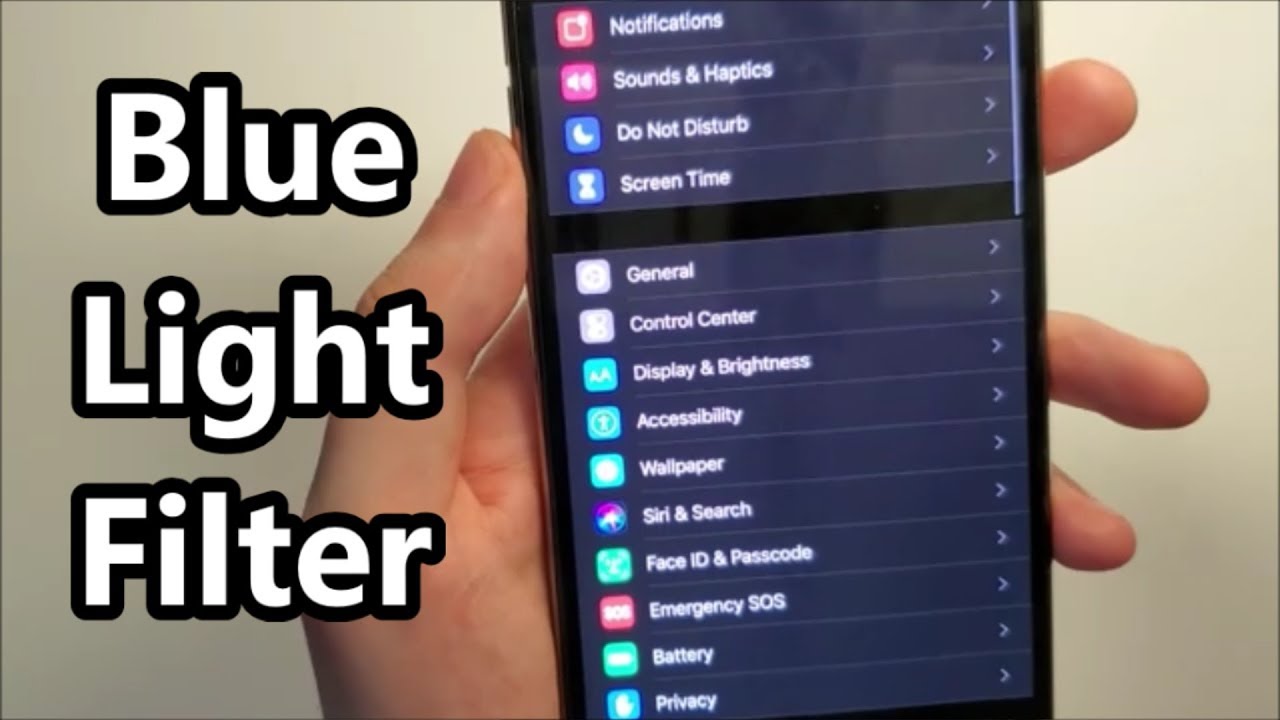
- Enable Night Shift today (Settings > Display & Brightness > Night Shift)
- Set up Screen Distance if you have iOS 17 or later
- Schedule your filter to activate 2-3 hours before your bedtime
- Experiment with different color temperatures to find your comfort level
- Implement the 20-20-20 rule for comprehensive eye protection