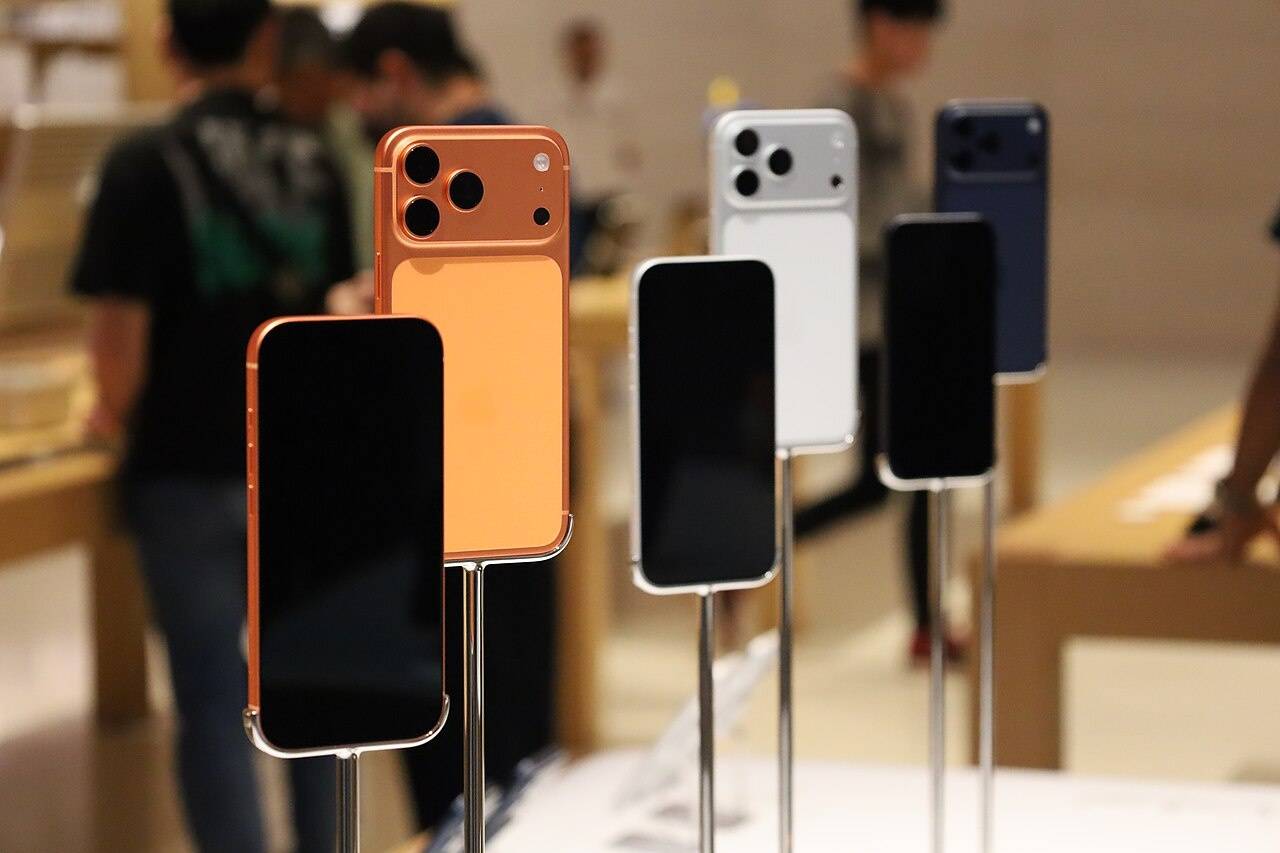

If you’ve been circling the Apple iPhone 17 Pro Max mostly for the camera, you’re not alone. Apple basically made zoom the headline this year, and it’s the first time in a while that “telephoto upgrades” don’t feel like a niche enthusiast talking point. They feel like something normal people will actually use.
This guide is meant to make the camera system understandable, not mystical. I’m going to translate Apple’s specs into real decisions: when to use 1x vs 2x vs 4x vs 8x, what “optical-quality” seems to mean in practice, and where the phone is quietly leaning on computation to fill gaps. If you want the broader buying call first, it’s worth starting with the full Apple iPhone 17 Pro Max review and then coming back here.
What changed in the Apple iPhone 17 Pro Max camera system?
Apple’s big claim is simple: all rear cameras are 48MP across the iPhone 17 Pro camera system. That matters because consistency is the whole game now—color, exposure, detail, and “does this look like the same moment?” shouldn’t fall apart just because you pinched to zoom.
The second big change is the telephoto itself. Apple says the iPhone 17 Pro models use a next-generation tetraprism design with a sensor that’s 56% larger than the previous generation, and it frames that as better sharpness in bright light and more detail in darker shots. In plain English: Apple wants you to trust the long lens more often, not treat it as a “daylight only” option.
Quick lens map: the zoom steps that actually matter
Before we talk about “8x,” it helps to map what the phone is doing. According to Apple’s tech specs, the iPhone 17 Pro Max camera system breaks down like this:
- 0.5x is the Ultra Wide camera (13mm equivalent).
- 1x is the main “Fusion Main” camera (24mm equivalent).
- 2x is an “optical-quality” 12MP 2x Telephoto enabled by the main camera (48mm equivalent).
- 4x is the dedicated tetraprism telephoto (100mm equivalent).
- 8x is also described as “optical-quality,” enabled by the tetraprism telephoto (200mm equivalent).
That’s a lot of language, and I think it’s fair to pause on it. Apple is basically saying: you have a true main camera, a true ultra wide, and a true 4x telephoto. Then it uses those sensors (plus processing) to produce “optical-quality” results at intermediate or extended steps like 2x and 8x. Apple also lists “8x optical-quality zoom in, 2x optical zoom out; 16x optical-quality zoom range,” and digital zoom up to 40x. If you want to verify the wording directly, Apple’s page is the cleanest source.
Now, here’s the human part: most people don’t care how it’s achieved. They care whether 8x looks good enough to keep, send, print, or post. So let’s talk about that.
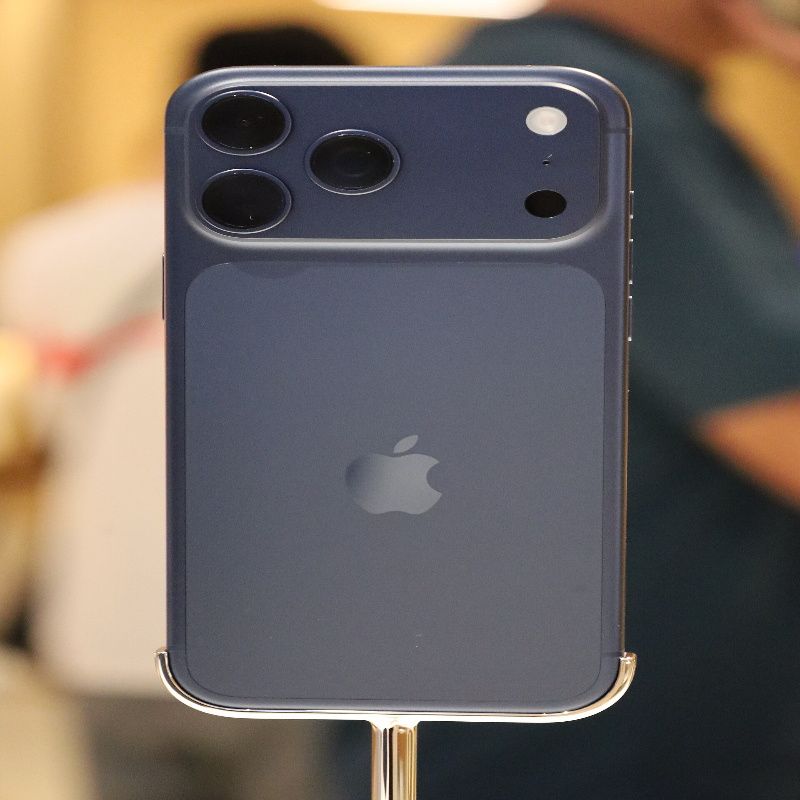
Zoom on Apple iPhone 17 Pro Max: what “optical-quality” means
Apple leans on the phrase “optical-quality” for both 2x and 8x, and it’s easy to read that as “this is the same as a dedicated lens.” It’s not quite that simple. In real usage, “optical-quality” is more like a promise about the result: the phone expects it can deliver a sharp, believable image at that zoom level without the watercolor mess people associate with digital zoom.
The reason 8x feels different this year is that Apple is anchoring it to an equivalent 200mm focal length and calling it the longest iPhone telephoto ever, while also framing it as part of a 16x total optical zoom range. That’s the story: you can stand farther back and still get the shot. It’s travel-friendly. It’s concert-friendly. It’s “my kid is on that side of the field and I’m not walking across it” friendly.
And I’ll admit it: 200mm in a phone is still a little surreal. It makes everyday scenes look more intentional just because of the compression. Faces look a bit more flattering. Backgrounds feel closer. It’s the classic telephoto look that phones used to fake in awkward ways.
When 8x looks genuinely great
If you’re in decent light—outdoors, open shade, bright indoor lighting—8x can look surprisingly clean. Edges hold up, micro-detail looks natural, and the photo doesn’t scream “I zoomed on a phone.” It’s the kind of result that makes you shoot more at 8x than you expected to.
My best advice is boring but effective: at 8x, keep your shutter speed friendly. If your scene is dim, tap to focus, steady yourself, and take two shots. That second shot is often the keeper. I don’t love that advice (it feels like homework), but it works.
When 8x starts to fall apart
Low light is where 8x becomes a judgment call. Apple says the larger telephoto sensor helps in darker shots, and you will see improvements compared to older long-zoom phones, but physics is still physics. At night, fine textures can soften, and moving subjects can get messy fast.
There’s also a subtle issue: “optical-quality” is not the same as “looks identical to 4x.” If you’re photographing something with critical detail (sign text at distance, intricate patterns, or a subject in motion), you may find 4x looks more consistently reliable than 8x. It’s not that 8x is bad. It’s that 4x is sometimes the safer choice when light is marginal.
4x vs 8x: how to pick quickly (without overthinking)
I like to keep this decision simple:
- Use 4x when you care about consistency, especially indoors or around dusk.
- Use 8x when you truly need reach, and you have enough light (or a still subject) to let the phone do its thing.
- If you’re above 8x, treat it like “documentation mode,” not “art mode,” because Apple’s own specs call anything beyond that digital zoom up to 40x.
That last point matters. “Digital zoom up to 40x” is useful when you want to read a sign or capture something you can’t physically approach. But it’s not the same as optical reach. It’s okay to use it. Just don’t expect miracles.
Portraits and people: the hidden telephoto win
Telephoto upgrades aren’t only for distant subjects. They’re also for portraits that look calm and intentional. Apple says the 4x optical zoom at 100mm offers a classic lens for portraiture, and that’s true in the sense that it produces a flattering perspective and less wide-angle distortion.
Where it gets a little complicated is framing. 100mm and 200mm are both “stand back” focal lengths, which is great outdoors but sometimes awkward inside smaller rooms. So you end up doing a lot of portrait work at 2x and 4x, and saving 8x for outdoor portraits, candid street shots, or stage-like situations.
If your goal is portrait-heavy use, it’s also worth reading the general buying guidance in the main Apple iPhone 17 Pro Max review because the camera is only half of the daily experience—the size and battery are the other half.
Macro, Ultra Wide, and the “0.5x problem”
Ultra wide cameras are often the least loved lens on a phone. People use them for dramatic travel shots, small rooms, and the occasional “I need everything in this frame right now.” Apple’s specs also call out 48MP macro photography, which can be genuinely fun when you’re close enough to make ordinary textures feel new.
But yes, ultra wide is also where you can see more distortion, more edge softness, and sometimes odd processing in mixed indoor light. That’s not unique to Apple. It’s just the price of going very wide in a very thin device. I still use 0.5x a lot while traveling, and then I forget about it for weeks at a time. That’s a pretty normal relationship with ultra wide, I think.
How to get the best results (simple, repeatable tips)
I’m not going to turn this into a “photography course,” but a few habits make the iPhone 17 Pro Max zoom system feel dramatically better:
- Prefer 4x for indoor zoom. If you’re tempted to jump straight to 8x inside a restaurant or auditorium, try 4x first.
- Take a second shot at 8x. Micro-handshake is real at 200mm equivalent, and the second frame often wins.
- Don’t chase 40x for aesthetics. Use it for information capture or “I need proof I saw this,” not for your best photo of the trip.
- Check your lighting before blaming the camera. If the scene is dim, any long-zoom system will struggle; stepping into better light helps more than you’d expect.
Video zoom: useful, but it’s a different game
Zooming while filming is where phones can look shaky or overly processed, and the iPhone is no exception. Apple’s specs list digital zoom up to 15x in video, which tells you the phone is designed to keep video zoom more conservative than photo zoom. That’s smart. Video makes every weakness obvious.
If you film a lot, it’s worth thinking about battery and heat too. Long video sessions, especially at higher resolutions and with lots of zooming, are demanding. If you haven’t already, the Apple iPhone 17 Pro Max battery life and charging companion can help you set expectations around heavier camera use days.
What creators should know (the slightly nerdy part)
Apple’s iPhone 17 Pro Max tech specs list formats like ProRAW and DNG for photos, and a long list of video capabilities including ProRes recording with external storage, plus pro workflows like ProRes RAW, Academy Color Encoding System support, Apple Log 2, and genlock support. If you’re building a workflow around the phone, those details matter because they affect file sizes, storage choices, and how you edit.
But here’s a small, honest caveat: just because a phone supports pro formats doesn’t mean your life suddenly becomes cinematic. You still need a plan—storage, backups, and the patience to manage bigger files. If that sounds like you, you’ll probably also want the Apple iPhone 17 Pro Max storage and price guide before you pick a capacity.
FAQ: fast answers people actually search for
Is 8x “real” zoom on the Apple iPhone 17 Pro Max?
Apple describes 8x as “optical-quality” at an equivalent 200mm focal length, enabled by the tetraprism telephoto system, and it lists a 16x optical-quality zoom range overall. In practice, it behaves like a premium long-zoom mode that can look excellent in good light, with more variability in low light than 4x.
What’s the difference between 8x optical-quality and 40x digital zoom?
Apple lists “digital zoom up to 40x” for photos, which means the phone can zoom far beyond its optical reach by cropping and processing. It’s helpful for distant subjects and documentation, but it won’t look as consistently natural as the optical/optical-quality zoom range.
Should I use 2x, 4x, or 8x for portraits?
Indoors, 2x and 4x are often more practical because you don’t need to stand as far back. Outdoors, 4x and even 8x can be wonderful for candid portraits and that compressed telephoto look—assuming your light is decent.
Conclusion: who this zoom system is really for
The Apple iPhone 17 Pro Max is a camera phone for people who actually use reach. If you travel, shoot events, photograph kids or pets from a distance, or just love the telephoto look, the 4x and 8x options make the phone feel meaningfully more capable than a typical “good camera” smartphone.
And if you’re still deciding whether the Pro Max lifestyle makes sense—big phone, big camera ambition, big price—go back to the full Apple iPhone 17 Pro Max review. It’s the best way to zoom out (sorry) and decide whether this is the right phone for you.